# Manage etcd
> A comprehensive guide for managing an etcd cluster including installation, backup, and restoration processes using Kubernetes and Helm.
# Manage etcd
The GreptimeDB cluster requires an etcd cluster for [metadata storage](https://docs.greptime.com/nightly/contributor-guide/metasrv/overview) by default. Let's install an etcd cluster using Bitnami's etcd Helm [chart](https://github.com/bitnami/charts/tree/main/bitnami/etcd).
## Prerequisites
- [Kubernetes](https://kubernetes.io/docs/setup/) >= v1.23
- [kubectl](https://kubernetes.io/docs/tasks/tools/install-kubectl/) >= v1.18.0
- [Helm](https://helm.sh/docs/intro/install/) >= v3.0.0
## Install
Save the following configuration as a file `etcd.yaml`:
```yaml
global:
security:
allowInsecureImages: true
replicaCount: 3
image:
registry: docker.io
repository: greptime/etcd
tag: 3.6.1-debian-12-r3
auth:
rbac:
create: false
token:
enabled: false
persistence:
storageClass: null
size: 8Gi
resources:
limits:
cpu: '2'
memory: 8Gi
requests:
cpu: '2'
memory: 8Gi
autoCompactionMode: "periodic"
autoCompactionRetention: "1h"
extraEnvVars:
- name: ETCD_QUOTA_BACKEND_BYTES
value: "8589934592"
- name: ETCD_ELECTION_TIMEOUT
value: "2000"
- name: ETCD_SNAPSHOT_COUNT
value: "10000"
```
Install etcd cluster:
```bash
helm upgrade --install etcd \
oci://registry-1.docker.io/bitnamicharts/etcd \
--create-namespace \
--version 12.0.8 \
-n etcd-cluster \
--values etcd.yaml
```
Wait for etcd cluster to be running:
```bash
kubectl get pod -n etcd-cluster
```
Expected Output
```bash
NAME READY STATUS RESTARTS AGE
etcd-0 1/1 Running 0 64s
etcd-1 1/1 Running 0 65s
etcd-2 1/1 Running 0 72s
```
When the etcd cluster is running, use the following command to check the health status of etcd cluster:
```bash
kubectl -n etcd-cluster \
exec etcd-0 -- etcdctl \
--endpoints etcd-0.etcd-headless.etcd-cluster:2379,etcd-1.etcd-headless.etcd-cluster:2379,etcd-2.etcd-headless.etcd-cluster:2379 \
endpoint status -w table
```
Expected Output
```bash
+----------------------------------------+------------------+---------+---------+-----------+------------+-----------+------------+--------------------+--------+
| ENDPOINT | ID | VERSION | DB SIZE | IS LEADER | IS LEARNER | RAFT TERM | RAFT INDEX | RAFT APPLIED INDEX | ERRORS |
+----------------------------------------+------------------+---------+---------+-----------+------------+-----------+------------+--------------------+--------+
| etcd-0.etcd-headless.etcd-cluster:2379 | 680910587385ae31 | 3.5.15 | 20 kB | false | false | 4 | 73991 | 73991 | |
| etcd-1.etcd-headless.etcd-cluster:2379 | d6980d56f5e3d817 | 3.5.15 | 20 kB | false | false | 4 | 73991 | 73991 | |
| etcd-2.etcd-headless.etcd-cluster:2379 | 12664fc67659db0a | 3.5.15 | 20 kB | true | false | 4 | 73991 | 73991 | |
+----------------------------------------+------------------+---------+---------+-----------+------------+-----------+------------+--------------------+--------+
```
## Backup
In the bitnami etcd chart, a shared storage volume Network File System (NFS) is used to store etcd backup data. By using CronJob in Kubernetes to perform etcd snapshot backups and mount NFS PersistentVolumeClaim (PVC), snapshots can be transferred to NFS.
Add the following configuration and name it `etcd-backup.yaml` file, Note that you need to modify **existingClaim** to your NFS PVC name:
```yaml
global:
security:
allowInsecureImages: true
replicaCount: 3
image:
registry: docker.io
repository: greptime/etcd
tag: 3.6.1-debian-12-r3
auth:
rbac:
create: false
token:
enabled: false
persistence:
storageClass: null
size: 8Gi
resources:
limits:
cpu: '2'
memory: 8Gi
requests:
cpu: '2'
memory: 8Gi
autoCompactionMode: "periodic"
autoCompactionRetention: "1h"
extraEnvVars:
- name: ETCD_QUOTA_BACKEND_BYTES
value: "8589934592"
- name: ETCD_ELECTION_TIMEOUT
value: "2000"
- name: ETCD_SNAPSHOT_COUNT
value: "10000"
# Backup settings
disasterRecovery:
enabled: true
cronjob:
schedule: "*/30 * * * *"
historyLimit: 2
snapshotHistoryLimit: 2
pvc:
existingClaim: "${YOUR_NFS_PVC_NAME_HERE}"
```
Redeploy etcd cluster:
```bash
helm upgrade --install etcd \
oci://registry-1.docker.io/bitnamicharts/etcd \
--create-namespace \
--version 12.0.8 \
-n etcd-cluster \
--values etcd-backup.yaml
```
You can see the etcd backup scheduled task:
```bash
kubectl get cronjob -n etcd-cluster
```
Expected Output
```bash
NAME SCHEDULE TIMEZONE SUSPEND ACTIVE LAST SCHEDULE AGE
etcd-snapshotter */30 * * * * False 0 36s
```
```bash
kubectl get pod -n etcd-cluster
```
Expected Output
```bash
NAME READY STATUS RESTARTS AGE
etcd-0 1/1 Running 0 35m
etcd-1 1/1 Running 0 36m
etcd-2 0/1 Running 0 6m28s
etcd-snapshotter-28936038-tsck8 0/1 Completed 0 4m49s
```
```bash
kubectl logs etcd-snapshotter-28936038-tsck8 -n etcd-cluster
```
Expected Output
```log
etcd-0.etcd-headless.etcd-cluster.svc.cluster.local:2379 is healthy: successfully committed proposal: took = 2.698457ms
etcd 11:18:07.47 INFO ==> Snapshotting the keyspace
{"level":"info","ts":"2025-01-06T11:18:07.579095Z","caller":"snapshot/v3_snapshot.go:65","msg":"created temporary db file","path":"/snapshots/db-2025-01-06_11-18.part"}
{"level":"info","ts":"2025-01-06T11:18:07.580335Z","logger":"client","caller":"v3@v3.5.15/maintenance.go:212","msg":"opened snapshot stream; downloading"}
{"level":"info","ts":"2025-01-06T11:18:07.580359Z","caller":"snapshot/v3_snapshot.go:73","msg":"fetching snapshot","endpoint":"etcd-0.etcd-headless.etcd-cluster.svc.cluster.local:2379"}
{"level":"info","ts":"2025-01-06T11:18:07.582124Z","logger":"client","caller":"v3@v3.5.15/maintenance.go:220","msg":"completed snapshot read; closing"}
{"level":"info","ts":"2025-01-06T11:18:07.582688Z","caller":"snapshot/v3_snapshot.go:88","msg":"fetched snapshot","endpoint":"etcd-0.etcd-headless.etcd-cluster.svc.cluster.local:2379","size":"20 kB","took":"now"}
{"level":"info","ts":"2025-01-06T11:18:07.583008Z","caller":"snapshot/v3_snapshot.go:97","msg":"saved","path":"/snapshots/db-2025-01-06_11-18"}
Snapshot saved at /snapshots/db-2025-01-06_11-18
```
Next, you can see the etcd backup snapshot in the NFS server:
```bash
ls ${NFS_SERVER_DIRECTORY}
```
Expected Output
```bash
db-2025-01-06_11-18 db-2025-01-06_11-20 db-2025-01-06_11-22
```
## Restore
When you encounter etcd data loss or corruption, such as critical information stored in etcd being accidentally deleted, or catastrophic cluster failure that prevents recovery, you need to perform an etcd restore. Additionally, restoring etcd can also be useful for development and testing purposes.
Before recovery, you need to stop writing data to the etcd cluster (stop GreptimeDB Metasrv writing) and create the latest snapshot file use for recovery.
Add the following configuration file and name it `etcd-restore.yaml`. Note that **existingClaim** is the name of your NFS PVC, and **snapshotFilename** is change to the etcd snapshot file name:
```yaml
global:
security:
allowInsecureImages: true
replicaCount: 3
image:
registry: docker.io
repository: greptime/etcd
tag: 3.6.1-debian-12-r3
auth:
rbac:
create: false
token:
enabled: false
persistence:
storageClass: null
size: 8Gi
resources:
limits:
cpu: '2'
memory: 8Gi
requests:
cpu: '2'
memory: 8Gi
autoCompactionMode: "periodic"
autoCompactionRetention: "1h"
extraEnvVars:
- name: ETCD_QUOTA_BACKEND_BYTES
value: "8589934592"
- name: ETCD_ELECTION_TIMEOUT
value: "2000"
- name: ETCD_SNAPSHOT_COUNT
value: "10000"
# Restore settings
startFromSnapshot:
enabled: true
existingClaim: "${YOUR_NFS_PVC_NAME_HERE}"
snapshotFilename: "${YOUR_ETCD_SNAPSHOT_FILE_NAME}"
```
Deploy etcd recover cluster:
```bash
helm upgrade --install etcd-recover \
oci://registry-1.docker.io/bitnamicharts/etcd \
--create-namespace \
--version 12.0.8 \
-n etcd-cluster \
--values etcd-restore.yaml
```
After waiting for the etcd recover cluster to be Running:
```bash
kubectl get pod -n etcd-cluster -l app.kubernetes.io/instance=etcd-recover
```
Expected Output
```bash
NAME READY STATUS RESTARTS AGE
etcd-recover-0 1/1 Running 0 91s
etcd-recover-1 1/1 Running 0 91s
etcd-recover-2 1/1 Running 0 91s
```
:::tip NOTE
The configuration structure has changed between chart versions:
- In older version: `meta.etcdEndpoints`
- In newer version: `meta.backendStorage.etcd.endpoints`
Always refer to the latest [values.yaml](https://github.com/GreptimeTeam/helm-charts/blob/main/charts/greptimedb-cluster/values.yaml) in the Helm chart repository for the most up-to-date configuration structure.
:::
Next, change Metasrv [backendStorage.etcd.endpoints](https://github.com/GreptimeTeam/helm-charts/tree/main/charts/greptimedb-cluster) to the new etcd recover cluster, in this example is `"etcd-recover.etcd-cluster.svc.cluster.local:2379"`:
```yaml
apiVersion: greptime.io/v1alpha1
kind: GreptimeDBCluster
metadata:
name: greptimedb
spec:
# Other configuration here
meta:
backendStorage:
etcd:
endpoints:
- "etcd-recover.etcd-cluster.svc.cluster.local:2379"
```
Restart GreptimeDB Metasrv to complete etcd restore.
## Monitoring
- Prometheus Operator installed (e.g. via [kube-prometheus-stack](https://github.com/prometheus-community/helm-charts/tree/main/charts/kube-prometheus-stack)).
- podmonitor CRD installed (automatically installed with Prometheus Operator).
Add the following to your `etcd-monitoring.yaml` to enable monitoring:
```yaml
global:
security:
allowInsecureImages: true
replicaCount: 3
image:
registry: docker.io
repository: greptime/etcd
tag: 3.6.1-debian-12-r3
auth:
rbac:
create: false
token:
enabled: false
persistence:
storageClass: null
size: 8Gi
resources:
limits:
cpu: '2'
memory: 8Gi
requests:
cpu: '2'
memory: 8Gi
autoCompactionMode: "periodic"
autoCompactionRetention: "1h"
extraEnvVars:
- name: ETCD_QUOTA_BACKEND_BYTES
value: "8589934592"
- name: ETCD_ELECTION_TIMEOUT
value: "2000"
- name: ETCD_SNAPSHOT_COUNT
value: "10000"
# Monitoring settings
metrics:
enabled: true
podMonitor:
enabled: true
namespace: etcd-cluster
interval: 10s
scrapeTimeout: 10s
additionalLabels:
release: prometheus
```
Deploy etcd with Monitoring:
```bash
helm upgrade --install etcd \
oci://registry-1.docker.io/bitnamicharts/etcd \
--create-namespace \
--version 12.0.8 \
-n etcd-cluster \
--values etcd-monitoring.yaml
```
### Grafana dashboard
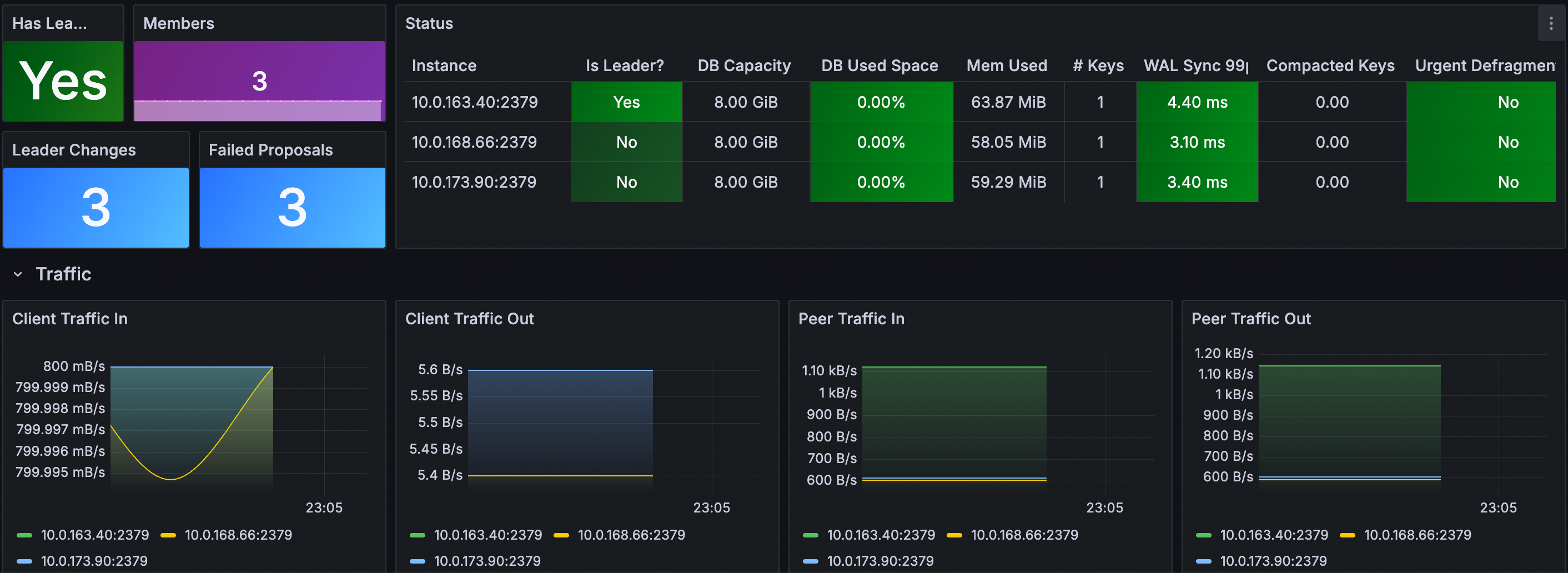
Use the [ETCD Cluster Overview dashboard](https://grafana.com/grafana/dashboards/15308-etcd-cluster-overview/) (ID: 15308) for monitoring key metrics.
1. Log in your Grafana.
2. Navigate to Dashboards -> New -> Import.
3. Enter Dashboard ID: 15308, select the data source and load.
## ⚠️ Defrag - Critical Warning
Defragmentation is a HIGH-RISK operation that can severely impact your ETCD cluster and dependent systems (like GreptimeDB):
1. Blocks ALL read/write operations during execution (cluster becomes unavailable).
2. High I/O usage may cause timeouts in client applications.
3. May trigger leader elections if defrag takes too long.
4. Can cause OOM kills if not properly resourced.
5. May corrupt data if interrupted mid-process.
ETCD uses a multi-version concurrency control (MVCC) mechanism that stores multiple versions of KV. Over time, as data is updated and deleted, the backend database can become fragmented, leading to increased storage usage and reduced performance. Defragmentation is the process of compacting this storage to reclaim space and improve performance.
Add the following defrag-related configuration to `etcd-defrag.yaml` file:
```yaml
global:
security:
allowInsecureImages: true
replicaCount: 3
image:
registry: docker.io
repository: greptime/etcd
tag: 3.6.1-debian-12-r3
auth:
rbac:
create: false
token:
enabled: false
persistence:
storageClass: null
size: 8Gi
resources:
limits:
cpu: '2'
memory: 8Gi
requests:
cpu: '2'
memory: 8Gi
autoCompactionMode: "periodic"
autoCompactionRetention: "1h"
extraEnvVars:
- name: ETCD_QUOTA_BACKEND_BYTES
value: "8589934592"
- name: ETCD_ELECTION_TIMEOUT
value: "2000"
- name: ETCD_SNAPSHOT_COUNT
value: "10000"
# Defragmentation settings
defrag:
enabled: true
cronjob:
schedule: "0 3 * * *" # Daily at 3:00 AM
suspend: false
successfulJobsHistoryLimit: 1
failedJobsHistoryLimit: 1
```
Deploying with Defrag Configuration:
```bash
helm upgrade --install etcd \
oci://registry-1.docker.io/bitnamicharts/etcd \
--create-namespace \
--version 12.0.8 \
-n etcd-cluster \
--values etcd-defrag.yaml
```
You can see the etcd defrag scheduled task:
```bash
kubectl get cronjob -n etcd-cluster
```
Expected Output
```bash
NAME SCHEDULE TIMEZONE SUSPEND ACTIVE LAST SCHEDULE AGE
etcd-defrag 0 3 * * * False 0 34s
```
```bash
kubectl get pod -n etcd-cluster
```
Expected Output
```bash
NAME READY STATUS RESTARTS AGE
etcd-0 1/1 Running 0 4m30s
etcd-1 1/1 Running 0 4m29s
etcd-2 1/1 Running 0 4m29s
etcd-defrag-29128518-sstbf 0/1 Completed 0 90s
```
```bash
kubectl logs etcd-defrag-29128518-sstbf -n etcd-cluster
```
Expected Output
```log
Finished defragmenting etcd member[http://etcd-0.etcd-headless.etcd-cluster.svc.cluster.local:2379]
Finished defragmenting etcd member[http://etcd-1.etcd-headless.etcd-cluster.svc.cluster.local:2379]
Finished defragmenting etcd member[http://etcd-2.etcd-headless.etcd-cluster.svc.cluster.local:2379]
```