Jaeger (Experimental)
The Jaeger query APIs are currently in the experimental stage and may be adjusted in future versions.
GreptimeDB exposes Jaeger HTTP query APIs under /v1/jaeger. The legacy endpoints remain available:
/api/services: Get all services./api/operations?service={service}: Get all operations for a service./api/services/{service}/operations: Get all operations for a service./api/traces: Get traces by query parameters./api/traces/{trace_id}: Get a trace by its ID.
Query trace data in GreptimeDB with Grafana's Jaeger plugin (recommended) or Jaeger UI.
Jaeger UI v2
GreptimeDB supports the HTTP API v3 used by Jaeger UI v2. Configure the proxy to forward /api/... requests to http://localhost:4000/v1/jaeger/api/..., preserving query parameters.
Example Jaeger UI proxy configuration in packages/jaeger-ui/vite.config.mts:
const proxyConfig = {
  target: 'http://localhost:4000/v1/jaeger',
  secure: false,
  changeOrigin: true,
  ws: true,
  xfwd: true,
};
| Request | Description |
|---|---|
GET /api/v3/services | Returns a services list. |
GET /api/v3/operations?service={service} | Returns an operations list with name and spanKind. Requires service; optionally filters by spanKind, for example spanKind=client. Kind names are case-insensitive and omit the SPAN_KIND_ prefix. |
GET /api/v3/traces/{trace_id} | Returns a trace by ID, with OTLP JSON data in result. |
GET /api/v3/traces | Searches traces, with OTLP JSON data in result. |
GET /api/v3/trace-summaries | Searches with the same filters and returns summaries, including root service and operation names, span counts, and per-service statistics. |
Search parameters
/api/v3/traces and /api/v3/trace-summaries accept these query parameters:
| Parameter | Description |
|---|---|
query.startTimeMin | Required RFC 3339 timestamp. Inclusive start of the search window. |
query.startTimeMax | Required RFC 3339 timestamp. Exclusive end of the search window; must be later than the start. |
query.serviceName | Optional service name filter. |
query.operationName | Optional operation name filter. |
query.durationMin, query.durationMax | Optional minimum and maximum span durations, both nonnegative, such as 1.5ms, 2s, or 1h2m. The minimum must not exceed the maximum. |
query.searchDepth | Optional maximum number of traces to return. Defaults to 100 when omitted or 0. Accepts 0–10000; values outside this range return an error. |
query.attributes | Optional JSON object with string keys and values, such as {"http.method":"GET"}. Strings that parse as numbers or booleans are used as typed filters. |
A trace matches only if at least one span satisfies all service, operation, time, duration, and attribute filters. Attributes can refer to span or resource attributes. With the v1 trace data model, attribute filters are ignored if the corresponding key is absent from both the span and resource attribute columns in the table schema.
Parameters also accept snake_case names, such as query.start_time_min. query.num_traces is an alias for query.searchDepth.
curl -G 'http://localhost:4000/v1/jaeger/api/v3/traces' \
  --data-urlencode 'query.serviceName=checkout' \
  --data-urlencode 'query.startTimeMin=2026-10-01T00:00:00Z' \
  --data-urlencode 'query.startTimeMax=2026-10-02T00:00:00Z' \
  --data-urlencode 'query.searchDepth=20'
This example searches for traces from the checkout service in the specified window. Replace the service name and time range with values matching the stored data. For each matching trace, the response includes all stored spans, including spans outside the search window.
For lookup by ID, trace_id accepts 16 or 32 hexadecimal characters. Optional startTime and endTime parameters use RFC 3339 timestamps. GreptimeDB validates these parameters but does not use them to filter the returned spans.
Invalid parameters return 400. Trace searches and ID lookups with no results return 404; services, operations, and summary queries return empty lists when there are no results. Errors use this response format:
{"error":{"httpCode":404,"message":"No traces found"}}
The GreptimeDB Jaeger API has these limitations:
query.filteris not supported. Requests containing it return400. Attribute equality filters can usequery.attributes.- Clock-skew correction is not supported. The
rawTracesparameter is ignored. - Jaeger gRPC queries are not supported.
Quick Start
We will use the Jaeger plugin in Grafana as an example to demonstrate how to query traces data in GreptimeDB. Before starting, please ensure that you have properly started GreptimeDB.
Start an application to generate traces data and write it to GreptimeDB
You can refer to the OpenTelemetry official documentation to choose any programming language you are familiar with to generate traces data. You can also refer to the Configure OpenTelemetry Collector document.
Configure the Grafana Jaeger plugin
-
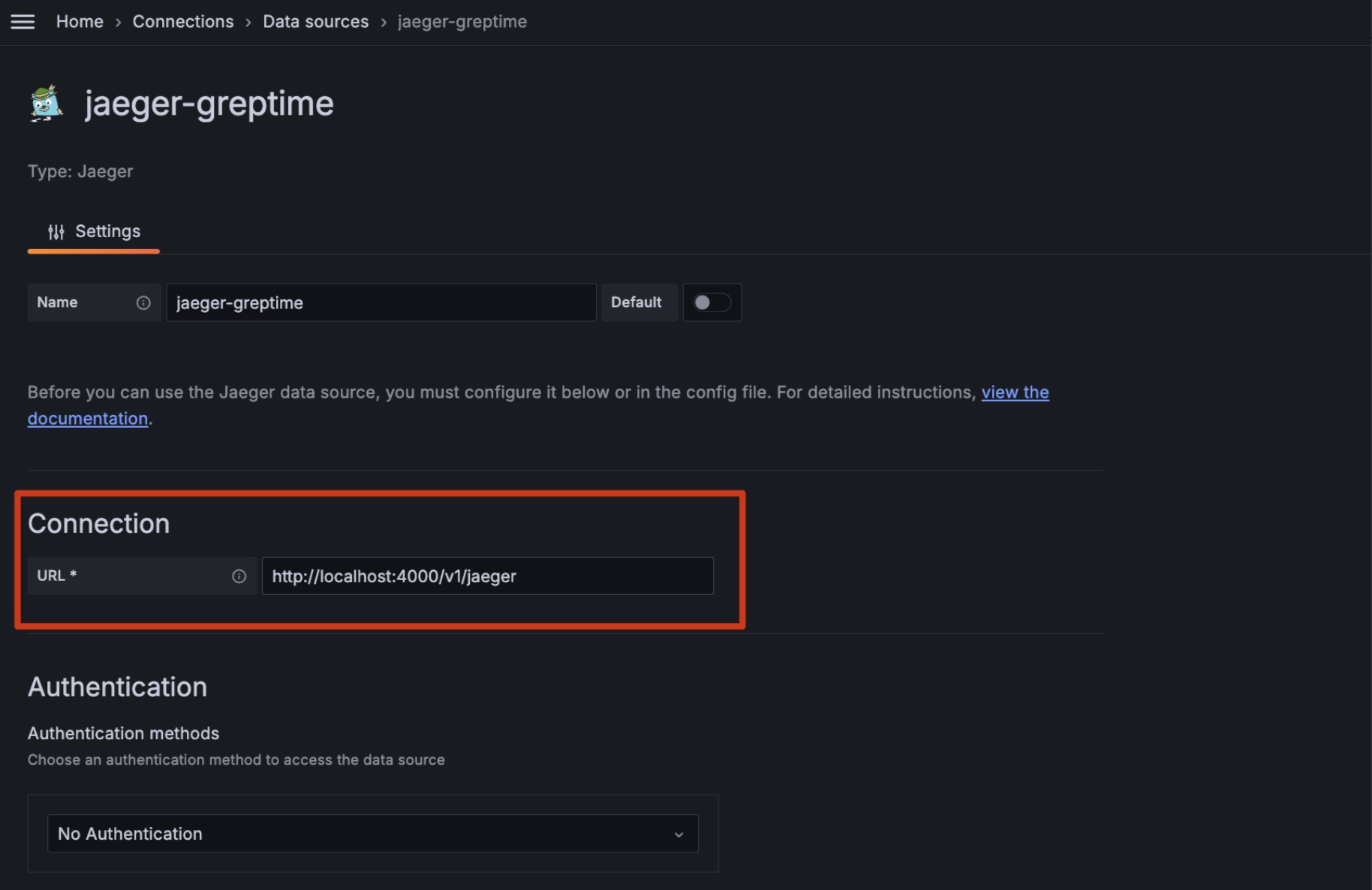
Open Grafana and add a Jaeger data source:
-
Fill in the Jaeger address according to your actual situation, then Save and Test. For example:
http://localhost:4000/v1/jaeger -
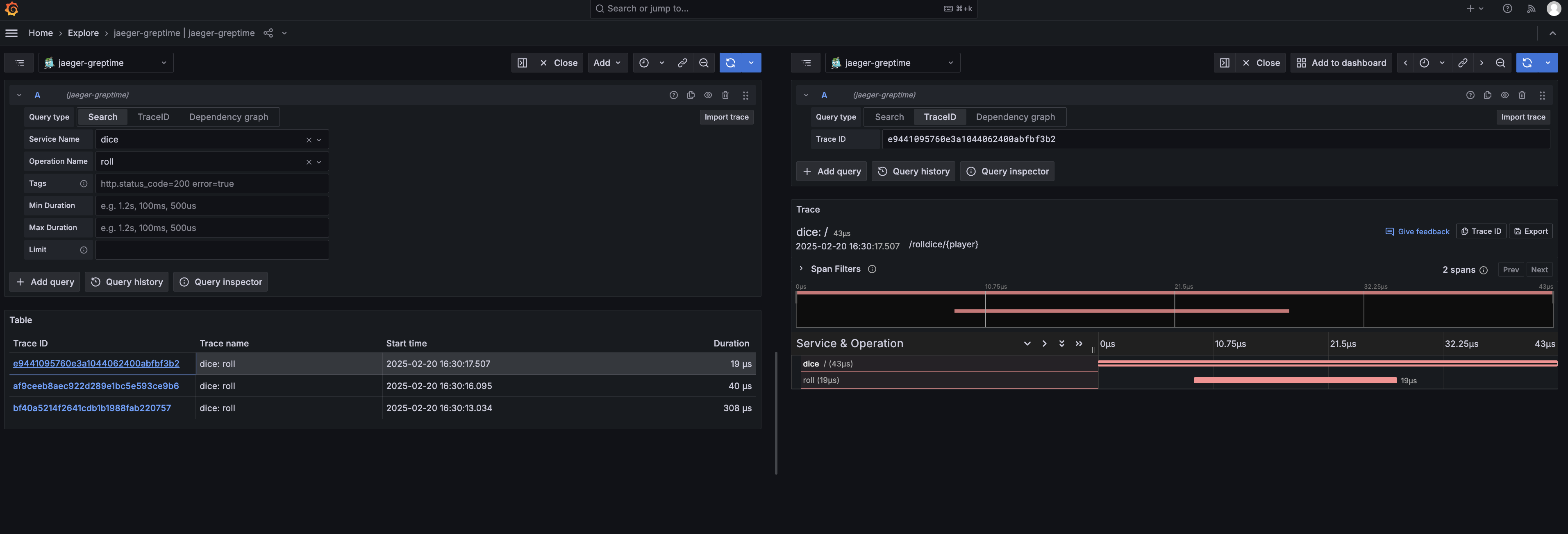
Use Grafana's Jaeger Explore to view the data:
Custom table
By default, the jaeger compatible API will use the default table name
opentelemetry_traces for its data. If you have multiple tables for trace data,
you can update this behaviour with HTTP header x-greptime-trace-table-name and
provide table name as the value.
This can be configured via Grafana data source settings.